How to use Smart Crates & Advanced Search? Query Syntax Guide
Crates includes a powerful query syntax that lets you filter and organize your music library using flexible, rule-based filters.
The same syntax works in both:
- Search – for temporarily filtering your library
- Smart Crates – for creating saved, auto-updating collections
A Smart Crate is simply a saved search that updates automatically as your library grows.
Here’s how to use queries in Crates:
Using queries in Search and Smart Crates
- Use a query in Search:
Type a query in the search box to instantly filter your tunes.

- Create a Smart Crate with the same query:
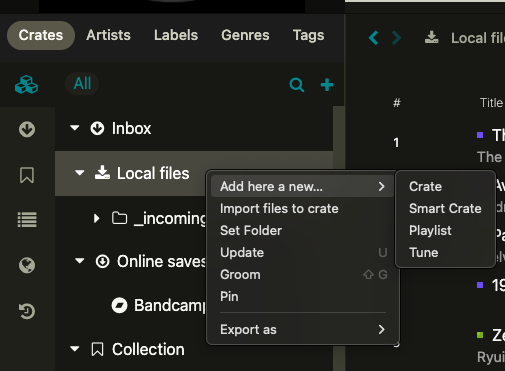
Navigate to your Crates library through the left-side tree, right-click the Crate that you want to insert a Smart Crate under, and select ‘New Smart Crate.’ Then enter the same kind of query there to create a saved, dynamic result.
- Define the filters:
Use the supported fields below to define which tunes should be included.
Here’s a loaded example:
in:Collection bpm>100 bpm<105 genre:bass tags:vinyl grouping:primetime discovered>2024-10-01
This query returns tunes that:- Are under the crate named ‘Collection’
- Have BPM between 100 and 105
- Have genre ‘bass’
- Are tagged with tag ‘vinyl’
- Have grouping ‘primetime’
- Were discovered after October 1, 2024
All fields in the example above are combined using AND (which can be included or omitted), meaning all criteria must be met for a tune to match.
How to think about it
- Search = temporary filtering
- Smart Crate = saved, auto-updating search
Operators & Syntax notes
Crates also supports advanced query syntax to create more complex filters:
- Wildcards:
Use*to match multiple characters and?to match a single character.
Example:genre:*hopwill match any genre ending with ‘hop’ (e.g. trip hop, glitch hop, hip hop). - Quotation Marks:
Use quotation marks"for exact matches or when string values contain spaces.
Example:genre:"uk garage" - ‘OR’ and parentheses for nesting logic:
Use parentheses()to group multiple conditions. This allows you to combineANDandORoperations.
Example:(genre:house OR genre:"uk garage") bpm>128 bpm<136 tags:boatparty - ‘NOT’ Operator:
Use!to exclude specific terms.
Example:genre:dub !genre:technomatches all dub tunes but excludes the ones with genre ‘dub techno’

Supported Fields
|
Field |
Description |
Type |
Example |
|
album |
Album name |
String |
|
|
artist |
Artist name |
String |
|
|
genre |
Genre of the tune |
String |
|
|
grouping |
Grouping field |
String |
|
|
tags |
Tags associated with the tune |
String |
|
|
title |
Name of the tune |
String |
|
|
rating |
User rating of the tune (1-10) |
Integer |
|
|
playcount |
Number of plays |
Integer |
|
|
bpm |
Beats per minute |
Double |
|
|
year |
Year of release |
Integer |
|
|
added |
Date tune was added |
Date |
|
|
discovered |
Date added to the collection |
Date |
|
|
lastListened |
Last played date |
Date |
|
|
in |
Filter by Crate |
Boolean |
|
Other Notes
- Additional text fields supported:
label,composer,remixer,albumartist,filename - Text fields will have
*appended by default to return incomplete terms, e.g.title:circlwill return ‘circle’ as well. - Please mind the spaces between fields and operators.
bpm>100is correct,"bpm > 100"is not valid. - You can use the same query in both Search and Smart Crates.
More examples
- Jazz In collection but not in playlists
: in:Collection!in:"DJ Playlists" genre:jazz - Recently discovered:
discovered>2026-03-01 - Your vinyl-only collection:
tags:vinyl - Ambient / chill selection and key A :
(genre:ambient OR tags:chill OR grouping:chill) and key:A*