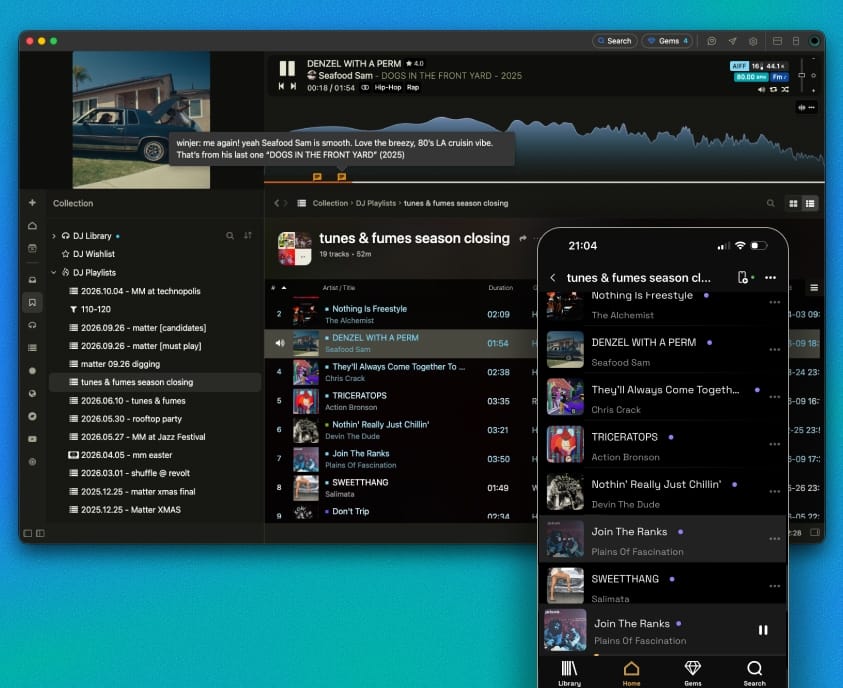
A music library manager for everything you own
Most music software still assumes your collection is a folder of files. It has not been that for years.
Your music is spread across folders and USB drives, purchased on Bandcamp, catalogued on Discogs, saved in YouTube playlists, liked on Spotify, and somewhere in an old iTunes library you have not opened since 2019.
Crates brings them all together under one home. It is a music library manager for local files and supported online libraries, giving you one digital music library to browse, search, and organize.
Crates is a good fit when:
- Browse across sources. Search and organize music from multiple sources in one place.
- Keep files where they are. No forced folder rebuild.
- Keep discovering. With the Crates browser extension to save finds from your browser and social features such as Gems, you keep new discoveries tidy and all in one place.

Why your music experience is fragmented
Nobody decided to scatter their collection. It just so happens when every platform is offering something different.
- Bandcamp: You found and purchased great music and you want to the artists to be paid properly
- Discogs: You catalogued your records there because that is where the all the data lives for vinyl releases
- YouTube: You saved things there because that’s where that rare vinyl rip was.
- Streaming: You keep one or more subscriptions because.. it is convenient.
The cost shows up in small moments: You cannot remember whether you own a record or just heard it. You want to play a run of tracks that live in four different places – so you play something easier instead.
A collection you cannot easily use results in a broken, confusing experience you can’t call your own.
Bring your music together without rebuilding your folders
There are several ways to start, depending on where your music is. Point Crates at your local folders and USB drives, and it indexes them where they are—without copying, moving, or disturbing a folder scheme you may have spent years on.
Connect supported online libraries from the Library menu or drag and drop supported links. For services such as Spotify, Napster, and Deezer, export your library as CSV, then import it into Crates. Crates imports the CSV, and can search your connected sources—such as Bandcamp, YouTube, and Apple Music—for matching audio.
Save as you discover. The browser extension helps you save releases and playlists while you are still on the page where you found them. It works across Chrome, Firefox, and Safari.
Start small. Begin with one folder, one playlist, or one collection. You do not need to reorganize your entire music life on day one.

Music services and sources Crates supports
Crates connects local folders and supported online libraries. Bandcamp, YouTube, SoundCloud, Apple Music, Discogs, and Spotify each work differently, so the table below explains what comes into Crates, what you can play, and which limits apply.
| Source | What comes in | Playback and limits |
|---|---|---|
| Local files | MP3, FLAC, AAC, WAV, and AIFF from the folders you choose. | Plays at the quality you own; files stay where they are unless you run an Action. |
| Bandcamp | Purchases and playlists. | Web playback is 128 kbps MP3; a Subsonic account connection can raise this to around 250 kbps. See the Bandcamp guide. |
| YouTube | Playlists and saved tracks. | Playback up to 256 kbps. Searching inside Crates requires a Supporter account because of API limits. |
| SoundCloud | Playlists and saved tracks. | Uses the SoundCloud stream available for the track and account: typically 128 kbps MP3 or 64 kbps Opus; eligible Go+ tracks can use 256 kbps AAC. |
| Apple Music | Your library and playlists. | Playback up to 256 kbps AAC with an active Apple Music subscription. |
| Discogs | Your catalogued collection and release data. | Useful for metadata and organization; it is not an audio source. |
| Spotify | Liked Songs, playlists, and albums as library entries. | No third-party playback. Spotify does not allow Crates to stream its catalogue. Crates can look for the same track on another connected source. |
| Google Drive | Music already stored in Drive; files can also be sent back from Crates. | Streaming and uploads depend on the connected Drive account. |
Organize your music collection and browse it your way
Getting everything into one place comes first.
Making it useful—and joyful to own—is where it’s at:
- First-class metadata. Integrations with Discogs, MusicBrainz, Apple Music, Bandcamp, and more help keep your artwork and metadata as good as they can get.
- Crates, playlists, and tags. Group music by the way you actually reach for it, across multiple dimensions—not only by folder.
- Artists, labels, genres, and tags. Browse your library in ways that help you learn more about the artists and labels behind your music.
- Smart Crates. Save a live filter that keeps updating itself as your library grows.
- Actions. Configure operations such as calculating BPM and key, fetching metadata, renaming files and folders, or converting formats with simple keyboard shortcuts.
- One search. Find music regardless of which source it came from—local or online.
What our users have to say
Your files and your local library data stay under your control
Your files stay intact.Crates does not write to your audio files unless you tell it to. Enable “Write ID3 tags to file” to write metadata inside the files. Nothing is moved or renamed unless you configure an Action to do it.
Your library database stays local. It is backed up periodically for recovery. You can also save a compressed copy to your preferred cloud provider on a schedule, and move the library to another computer if you need to.
No upload of your audio files or library database. See the privacy policy for details about account, support, and application data.
In short: no forced folder rebuild, no audio upload, no sketchy reporting to third parties—and no monthly Supporter subscription.

Take your library to your phone
Crates has iPhone and Android apps that connect to the desktop over your local network or VPN.
- Sync library metadata.
- Stream from the desktop over Wi-Fi or VPN.
- Download your files for offline listening.
The mobile apps require a desktop installation and a Supporter account.
Tracks that only exist as online sources remain available according to the source’s playback rules.